
Build a successful & profitable business with social media

As business owners, we’re just trying to figure out what it’s going to take to be successful and profitable in the most effective way possible, which is why I’m going to break down how you can build a successful and profitable business with social media. I have been in this game since 2009, being a social media marketer in 2009 wasn’t even a job that really existed. So I think I’ve got some years and a whole crap ton of experience to help make this dream possible for you. I’ve worked with hundreds of businesses and have been able to figure out what’s going to work for you so that you can find success. Getting Started When you’re getting started, you’re actually going to dive into what your objectives and goals are with your social media. It can’t be something as lame as like, “Oh, I want to get sales.” Sales is the objective of everything, making money as our bottom line. So let’s just assume that that’s everyone’s goal. And what we’re going to figure out is, what are the other goals that you want to attach to your social media? Do you want to make a hundred thousand dollars a month? Do you want to build your list to 10,000 people? Are you trying to promote yourself as an expert in your industry? What are the very specific goals that you want to set and how do you want to accomplish them on social media? By having those very clearly defined, it’s going to make everything that you’re going to create, produce, and funnel make sense for you because your bottom line, which is the goal and the objective is all that truly matters. Social media is just a really fun way to get to that goal. Know Your Audience Now you need to study and know your audience. This goes into knowing who your perfect customer is, who would you sell to? Who would you love to work with? By knowing exactly who this person is, you’re going to be able to, again, get those goals and objectives met sooner. And you’re also going to be able to funnel in a lot of these other things that we’re going to talk about. You have to know who you’re talking to. That’s how this whole marketing thing works. You have to know who you’re talking to. So you know exactly how to phrase things where you should be, what you need to offer them and how you’re going to do that. I know that you are here because you want to build your business profitably and how you’re going to do that is because I’m relating to you, because I too am a business owner. I have lots of experience and you definitely came for the information, but stay for the sassiness. That is what we’re here to do. I know you. You don’t know me. I know your objectives. I know your struggle, which is why you are here reading this blog. Now, once you know who you’re talking to, you’re going to be able to figure out where it is that they spend their time online. Finding Your Audience Not everybody’s social media habits are the same. Some demographics really like Facebook. Some demographics like Instagram. Some people are really into Twitter. Some people are really into Clubhouse. Some people are really into YouTube. You have to pick the platform that’s going to talk to the greatest portion of your audience. I know mine, a platform for talking to people is on YouTube. But I also know that my secondary platform is actually going to be on Instagram because that’s where I can connect with people in a totally new, fun way versus like what I do here, which is inform you and educate you in long article form. Over there, I’m having fun, maintaining, informing and inspiring. So I know where you like to spend your time, which is why you’re here. You need to figure out where your people spend most of their time and you usually can dive into it by those demographics. Now, once you pick the platform, you need to study the kind of content that performs best on that platform. How to post on the best platform For the most part, you can probably bank on the fact that video of some kind is going to be in a really important part of what you’re going to create. If it’s Instagram, doing stories and reels is really vital to your success. If you’re on YouTube, long form content is going to be successful. If you’re doing something on Facebook or Twitter, you’re going to probably want short form video content. Whatever the mediums are that performed best on those platforms, you need to figure out what those are and study them and analyze them so that you’re going to be able to create content that’s going to be effective for your audience to accomplish your objectives and goals. Do you like how I like it brought that all back around? Can you do what is needed or do you need help With the studying of what kind of content you should be creating and what’s going to perform best. You’re also going to need to tap into the like, “Am I skilled enough to make this happen?” So a little story about your girl Desiree from day one, day one of being on YouTube, I have had an editor. That’s right. I knew it was so important for me to be here to help you, that I needed to remove any barrier I had that as a mom, as a military wife and an entrepreneur running a business, and this amount of time to do it and trying to add in this other thing of doing video editing was not a skill I was willing to develop or something I was willing to sacrifice that time for. So by
9 Live Streaming Tips and Tricks for More Engagement
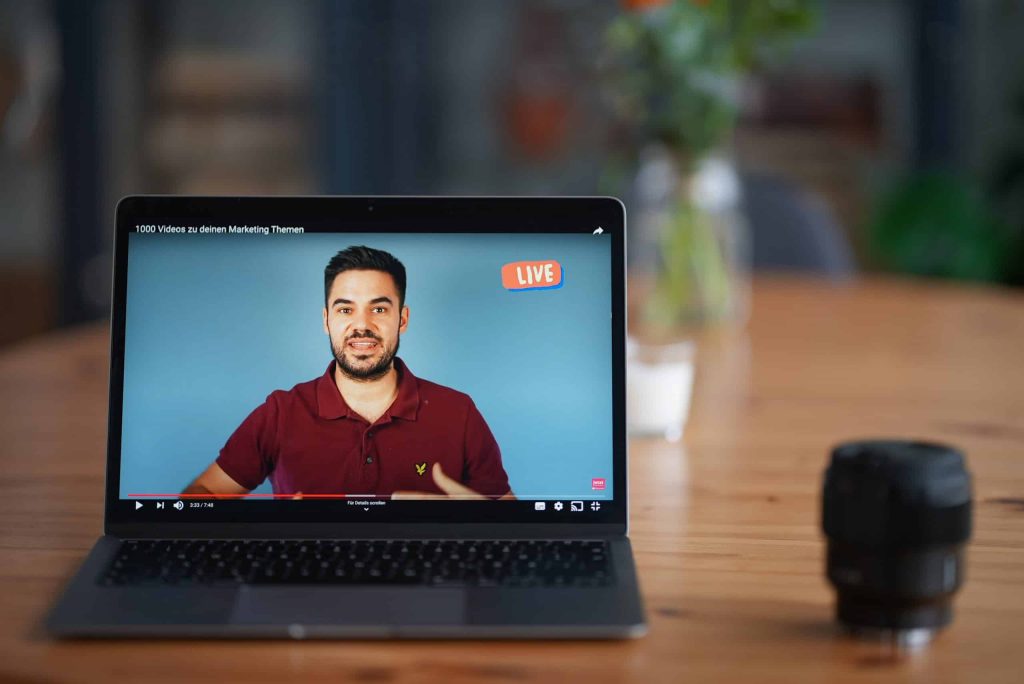
One of the biggest benefits of getting a livestream is that you get to engage with your audience, but how do you get people to actually show up and do things for your livestream so that you can have that engagement and build up for every community that you’re looking for? I’m going to break down for you how to create a more engaging livestream so that you can just crush it with your live streaming goals. Let’s dive into these different things that are going to help make sure that your live streaming game is going to be on point. Now, before you even start live streaming, before you even hit that go button, you want to make sure that you have everything in place to make sure that your livestream has the most chance for success, that you have a good view for your webcam, that you have really good internet, that you have good lighting, that you have good sound. To know all the things that you need to have in place in order to hit that live button with success, I have a checklist that’ll break down everything you want to make sure that you grab and do before you even dive in to your livestream. This checklist is going to go over things like lighting, sound, run of show and so forth. Live Stream Promotion It’s important to make sure that you’re not just going live for the sake of going live. You want to have a warm-up and a lead into it. You’re going to be able to schedule your livestream up to a week before they go live, and no longer than that. Facebook does not let you do anything more than seven days in advance, and YouTube is going to want you to do that as well. So schedule your livestream ahead of time and make sure you have everything very clearly spread out. You want to have your title. You want to have your description. You want to have a good thumbnail and you want to know what time you’re going to be there. A lot of people ask, can I promote? Can I boost, put money behind my livestream? And the answer is no, you cannot boost or promote a livestream and largely because that content hasn’t been created yet. In order for Facebook or Instagram or YouTube advertising to work, they have to know what the content is going to be. Well, you haven’t gone live yet, so you don’t know what you’re going to say or do yet. Therefore, they cannot approve any kind of boost of post because of their terms and conditions. However, what you can do is create a Facebook event that will promote your livestream. You can boost that. You can also do posts on your Facebook and boost those as well, or do them on Instagram or wherever else you are using. Whatever your means are for promoting, by having that scheduled link to share, it’s going to make it easier for you to promote your live stream and get more people to attend. Producing your live stream So now, we’re going to dive in what you want to do during your livestream to make sure that it flows well and that it’s engaging well. First things first, don’t jump right out of the gate with what you’re going to say. I don’t jump into, “hey guys, let’s dive into this”, because you’re not giving any time for your audience to join in. It takes a second for those modifications to come through for Facebook and YouTube. So give it a little bit of a padding, like a three-minute timer might be a really great lead in for you. By having a countdown timer, it gives time for all of the notifications to happen, for people to join in on you so that you know what’s going on and they can kind of get all set and cozy and ready to consume your livestream that you have created. If you just dive into it, you’re going to hurt yourself. For those of you that record for the replay, remember in Facebook and in YouTube, you can edit out those beginning and end parts that maybe you don’t want to have for your recording that you use again and again and again. So don’t worry about that timer staying there forever. You just want to make sure you have it leading into the livestream.The next thing that you can do for your livestream to make it more engaging is start with a little bit of banter and fun. Have a reason leading into what your main topic is. So let’s say you’re doing a whole video about the latest in the insurance business, like 10 things you need to know about what’s changing in insurance. Maybe you can have a little banter about humor, funny things, things that are happening at your agency or whatever it may be leading into that. One of the bonus steps I want to give to you is it’s really great to have a co-host, even if it’s just a guest that comes in on a regular basis to help you. It’s really helpful to have someone to bounce things off of and have conversations with. Trying to do a livestream by yourself can be really hard. I know, I do it on a regular basis with the Women of YouTube group and a lot of it’s because I’m teaching people how to do things and I’m relying on the comments to get the back and forth started, but when I have a guest on, it just goes so much better and it’s just so much more fun and fluid. It’s much more conversational versus me commenting on comments. So, consider having a guest to have as a banter for you and have that lead in, that warm-up, into your main topic. Getting Engagement on your Live Stream
Live Stream Tips & Trends for 2021
I talk about live streaming a lot in this channel, and I will be the first to admit that there are a lot of other really amazing live streaming experts out there to learn from. So in this video, I brought together 10 of my friends and experts to help give you more tips and trends that you can expect for your live streaming game in 2021. I truly believe that livestreaming is one of the easiest ways to create video content for any business. You don’t have to worry about editing. You don’t have to worry about all the extra bells and whistles. You can just go live and share your genius and truth and make the magic happen, which is why you’re going to need a really great tool to do this. “My quick livestreaming tip, it’s an obvious one when you hear it. But it’s to run a speed test before you go live. You want to make sure that the internet speed that you’re using, specifically the upload speed, is going to be good enough for a consistent, high-quality stream or feed from your computer or your device through to whatever platform it is that you’re going to be livestreaming on. – Justin Head over to the website speedtest.net and run a test on there or grab the speed test app on your device. Specifically what you’re looking for when you’re running a speed test is your upload speed. You also want to make sure not only that you have enough upload speed, but also that it is a consistent upload speed, that it’s not really good for a few seconds and then really bad and fluctuating a lot. Running a speed test will tell you those two things, that you have a decent enough upload speed, but also that it is a stable connection as well. Then for the cases where your internet speed might not be enough or it isn’t stable, then that’s when you could look at an alternative internet connection before you go live, so maybe hotspotting from your phone or another device, just so you can save your sanity and have a better, more successful livestream.” I cannot tell you how many times I go into livestreams and other people are just having all of the glitches and all the problems, or even for myself, I go into livestreams, and my internet cannot get it together. So really heed Justin’s advice and do that speed test before you dive into a livestream, and if all else fails, just restart everything before you plan to go live. “One of the tips that I would definitely give when it comes to entrepreneurs that’s getting into content creation is to really pay attention to short-form video content. If you’re already doing a livestream, one of the best things that you can do is begin to repurpose that content, meaning you’re taking your 30, 40, 60 minutes or longer livestreams, and you’re reproducing that into shorter form content. When you think about TikTok and what all happened in 2020, it got to the point where everybody’s focusing on 15, 30, and 60 second videos, and you may be thinking that’s not enough time to really provide enough value, I would suggest that it actually is. When you think about what can you do in 15, 30, or 60 seconds, it makes you have to be very, very specific about what you say, what you show, and what you share. When you think about your outline or your run of show for your livestream, what is a tip that you can bake into that livestream so that you can go in later and pull that 15, 30, or 60 second piece out and redistribute that to whether it’s TikTok, Instagram, or what have you. Really pay attention to not just the pieces and the tips and the value that you’re going to deliver in the livestream, but really start thinking about how you can repurpose that content. All of that is going to start in the preparation phase of your livestream, thinking about the outline, baking in those tips or the points that you want to address, that you can then pull those snippets out and share them on social media in short-form, micro content.” – Diana Gladney You know I love me some content repurposing up in these parts, and livestreaming is a great way to do that. Diana hit the nail on the head. This is the best thing that you could do with your livestreams to get more mileage out of them, to help grow your brand, and of course, cover your bases with that content calendar. “My number one tip for 2021 is to make sure that the streams you create this year hold true to your value proposition from the beginning to the end. This way, your viewers will find value not only in your regularly scheduled content but in the videos you livestream. The replay value can add up to thousands of more views than you’re already driving to your channel.” – Daniel Batal It’s really easy for us to get distracted with all the different things that we have going on and objectives and purposes of what we’re trying to do. Keeping your value proposition in mind is going to allow for your vision and purpose for your channel and for your business to be incredibly clear, not just for you, but also for your audience. “My tip for you is to have more guests on your shows. I love having guests. In fact, when I look back at all my analytics, some of my most high performing livestreams are when I have a guest come on my show, whether it be a fun guest, a customer, a peer, or somebody that comes and offers a lot of value for my audience. “You want to be selective with who you’re going to have on your show. You want to
Complete Facebook Marketing Strategy for 2021
As Facebook continues to be the number one social network used by most people, it is important to make sure that your business is using it correctly. So in this post, I’m gonna give you 11 business strategies to help you grow your business organically on Facebook. The key to anything that comes into doing things on Facebook is gonna start with a killer content strategy. I have a free content planning worksheet for right here that you should definitely go grab before we dive into this. Algorithm The first thing that it’s important for you to know is we really need to understand how the algorithm works. This is gonna dictate how you’re going to create and do things on Facebook. So stick with me here ’cause this is a little explanation-y, but it’s gonna be really important as we continue through our other 10 topics. The objective of anything that you post on Facebook is to show it to as much of your target audience as possible. With every single post that happens on Facebook, whether it’s in a group, a personal page or a business page, it’s going to receive a score. That score is gonna determine how the whole post will succeed or fail on the news feed. The most important thing with understanding the score is that everything that gets posted has to be relevant to the user. Imagine you’re posting something about your baby on Facebook but you have some friend over here that’s a single person who hates children. The likelihood of Facebook putting that piece of content in front of them is very minimal. They’ve proven to the Facebook algorithm that they are very uninterested in that content. User activity will determine who sees what. It’s gonna come from a score of highest to lowest. Every single person’s news feed algorithm is different. That’s over 2 billion unique news feeds! So it’s really important to make sure that what you’re creating is very specific to your target demographic. What determines a successful post on Facebook? There are three factors that come into the success of a post. These are going to be engagement, who posted it and the post age. When it comes to engagement, obviously, it’s gonna be things like comments, emojis, sharing, likes, not likes, hearts, all that stuff, and of course who clicks on the links that you have on your page. When it comes to who posted it, Facebook’s gonna continue to serve your content to the people that are engaging. If you’re not already getting a lot of engagement, you basically will be dying a slow death on Facebook. So it’s important to make sure that what you’re creating is engaging and hopping. And I have some pointers for you – don’t worry. When it comes to post age, the older it is, the lower the score is. That is why you usually have about a 48-hour shelf life on Facebook for your post to be relevant and matter. Now, when you post something new, how does that post get seen by the algorithm? Well, it will service your content to a small group of people that are most likely to engage with it. If they see that that group is engaging with it, they’re gonna show it to more people to try and increase the reach to keep the engagement growth alive for that post, which is why when you first post something, it’s important to make sure that when you post and what you post has the best chance for success. So this leads into our next one, which is you want to create quality content. Quality Content Now, there is a lot of bad stuff on the internet. We know people need to get it together when it comes to creating content and stop being so dang lazy. I am sure that so many of you have scrolled right on past those generic stock photos that have a bitly link and probably have some kind of branding in the corner. No one’s buying it. You need to make sure that what you’re posting is visually appealing and something that you would actually choose to engage with yourself. So some tips for you are gonna be: Link overload You don’t wanna post a link on every single thing that you do. Even if you have a really great image that is engaging, maybe has cool texts or teaching them something, if everything that you’re posting has a link to something, it’s gonna get old real quick. And of course, Facebook doesn’t want you to always be taking people outside of the platform. So try to be engaging and interactive without taking people away from the platform they are on. Be personable This is something that is really hard for older brands and big companies. It’s like, how can I be personable and relatable when I’m trying to be this big brand entity? And the best way to do that is to just remember that you are talking to people and you are a person yourself. Show up in that way and it’s gonna be really helpful for you to connect personally because that’s what people want. Call-to-Action Make sure your post has a call to action or a CTA to engage. This is gonna be where you ask them a question at the end. Leave a specific emoji response, like thumbs up if you like this or heart if you loved this or a sad face and tell me why didn’t like it down below. Whatever’s happening, give that specific call to action within the post that has nothing to do with clicking a link. Share and show emotion You wanna connect with people in a way that’s gonna make them be like, huh, I really feel something. This is what’s gonna make me connect with this brand even
Fonts on Facebook – How to Change!
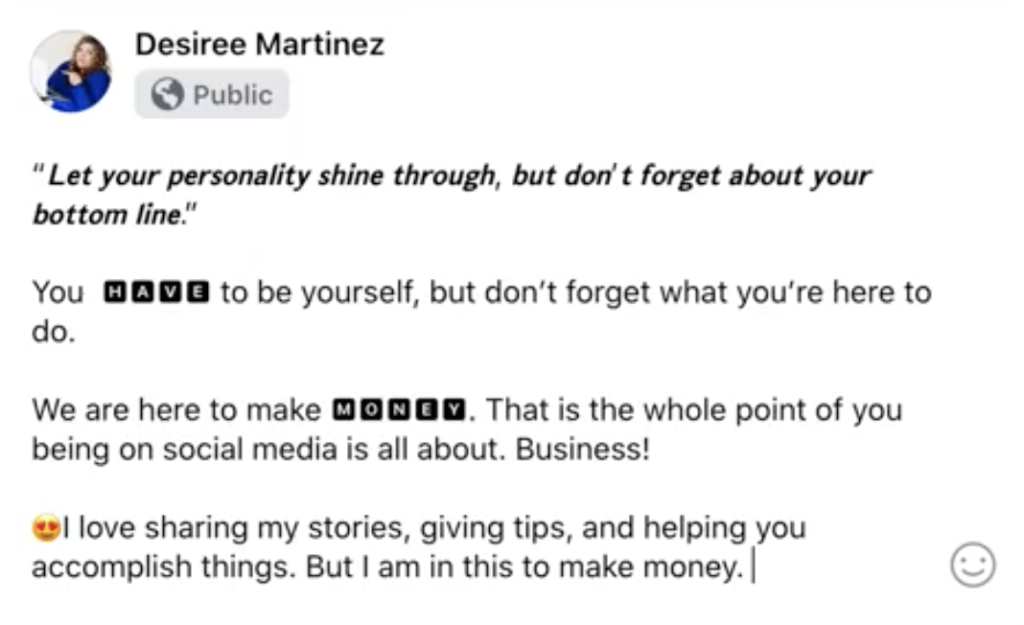
I bet you’ve seen people use cutesy little fonts on Facebook and you’re wondering how to do the same. Write out your messaging Search ‘unicode text converter‘ into Google Paste your text Choose your favorite font! Copy and paste into Facebook Design your post with different fonts for different phrases or words And that’s it! My blog and my YouTube channel have tons of information to help you grow your business with content marketing. Remember, you are impossibly amazing!
Find old Facebook Posts on your Timeline! (2021 Update!)

Time for another tutorial update! I’m gonna be showing you how to find old posts on Facebook. The newest update is super detailed and can help you find posts fast! Go to your Facebook Profile Click ‘Filters’ Choose the year, month and day you want to go back to Choose who it was posted by or if you want tagged posts Posts will be in chronological order! For a visual, check out my video:
4 Marketing Services EVERY Business Needs!

I create a massive amount of content for my business – not only for myself, but for my clients as well. On the way to becoming the agency I am today, I had to get a little help along the way. I’m gonna share my 4 favorite tools for growing your business with content marketing. Design Pickle Graphics are an essential part of social media marketing. Design Pickle is your #1 graphic design factory for your company. For a flat rate, you can get as many graphics as you want per month to help you with your digital marketing. I used to use Design Pickle for all the graphics for our clients when I first started my business at All-in-One Social Media. They do an amazing job with whatever needs your brand has and I highly recommend checking them out. Video Husky Since I started my YouTube channel, I’ve used an editor. Video Husky is a flat-rate video editing service that takes the stress out of video and content creation. I’ve now hired an editor for my business but Video Husky definitely set the standard for me. They’ll improve the quality of anything you’re going to create. Custom Thumbnails One of the things I really struggled with on YouTube was my click through rate. Custom Thumbnails is my absolute favorite thumbnail design tool. They’re able to take your vision and turn it into an image that people will want to click on. Solid thumbnails are essential for your success on YouTube! All-in-One Social Media We are a do it for you social media agency that manages all of your content for you. We’ll create your posts, manage your graphics, and make sure your message is getting seen to accomplish the goals of your business. We are a mission driven agency that focuses on helping your business get seen while putting military spouses to work anywhere that they’re stationed around the world. Consider working with us to manage your social media marketing so you can focus on what you already do best! My YouTube channel and my blog have all sorts of posts to guide you in the right direction for marketing your business online. Check out the video for this post below!
9 Best Tools For Social Media Marketing

Social media marketing is this perfect balance of creating engaging content and managing it to make sure it works effectively for you. My favorite tools that help me with management, engagement, creativity, and so much more. Now everything in social media marketing starts with a solid content plan. Click here to download my free worksheet that will help you map out everything you need and make sure social media is working for you as much as possible. Now let’s get into the tools! Emojipedia The easiest way to get engagement is the use of social media. However, when you’re doing posting and scheduling from a desktop, you don’t have the same emoji keyboard. Emojipedia has every emoji you need that you can just copy and paste right into your posts. Sendible I’ve tried every single platform on the market – this always comes back to being the best. Sendible has amazing reporting, an easy interface, and the ability to collaborate with team members. I can also post on every single platform that I want on there, like YouTube and Pinterest. You can also see a calendar of every scheduled post. You can even schedule videos and gifs! Tenor I love using tenor for all of my gif needs. If you create a free Tenor account, you can make your very own GIFs and create your own library. Kapwing Kapwing is my go-to social video tool. Not only am I able to edit videos and create closed captions, I can also create GIFs, memes, and so much more. They’re always loading in new features and ways to create. And the best part is it’s free! TubeBuddy TubeBuddy is your best friend on the journey of YouTube. It takes your videos and makes sure that they’re gonna work for you as best as possible. It helps find keywords for your title and description, compares to similar videos, and ensures that your video is categorized accordingly. Streamyard Make sure your livestreams are kickin’ with Streamyard. You can use it for interviews, to answer questions, and so much more. This is a browser-based livestream tool that allows you to multitask while streaming. You can also add overlays, respond to comments, and more! Adobe Spark Adobe Spark is my favorite website to create social graphics. There are countless pre-made templates to choose from or you can start from scratch. You can also add in your own branded fonts, colors and more that can be added into your account. Rev.com I use rev.com to create closed captions for my videos. I’m also able to download the closed captions and use them as a base copy for the written version of my videos on my blog. It’s important to create blogs because a lot of people prefer to skim an article over watching a video to get the information they’re looking for. ConvertKit ConvertKit is hands-down the best email marketing tool out there. I’ve tested this time and time again over the next few years. I can create landing pages, lists, tags, and even send specific emails to specific segments of my email list. If you make some monumental error, you can even edit a link in emails that have already been sent! I want to remind you to grab my content planning worksheet here to get started with social media marketing for 2021. You can also check out my YouTube video below for more on these tools and how I utilize them.
How to Create a Facebook Business Page
Facebook is basically essential for businesses these days. Without a Facebook page, a lot of people will think your business doesn’t exist! I’m gonna break down exactly how to set it up in this post. You have to first make a Facebook account before creating a business page. Click ‘create a new page’ Fill in the relevant information Choose three categories that your business fits into Write a short description – this can just be your bio from Instagram or Twitter! Create page Add profile and cover photo The profile photo can only be 180 x 180, so keep this in mind Your cover photo is bigger on mobile than on desktop. The most important piece of your image should be between 312 x 820, but the whole image will be 416 x 820. Go through Important Next Steps Create a welcome post Invite friends Add a page button for visitors – Creates a call to action! View as a visitor to see preview Go through ‘Set up Your Page for Success and add relevant information’ Add in your Services Optional – click ‘More’ for setting up a shop, viewing offers, posting photos & videos, etc Claim a username – this is really important! This is how everyone finds you on the internet. Try to make it the same across all platforms! Go through settings like page visibility, notifications, etc Add someone you trust as an Admin as a backup in case something goes wrong with your account Now your Facebook business page is ready to go and you can get started sharing your messages, connecting with your audience and promoting your brand. I have a whole series of Facebook tips on my YouTube channel – click here! https://www.youtube.com/playlist?list=PLBjwayNn15FZTOHgh7mKKPcPpdPn8-DuL
How to use Facebook Marketplace

Have you ever wondered how to use Facebook Marketplace?! This step-by-step tutorial will show you exactly how! Go to facebook.com/marketplace to get started. Lets go over the interface: Live shopping: buying products during a Facebook live Notifications: activity about items you are buying/selling Cart: your shopping cart Your account: view the items you are interested in buying/selling Your listings: items you have posted for sale Saved: reference items for later that you may want to buy Purchased orders Following Commerce profile: your profile You can also look at items by category. These are the same categories that you will put your for-sale items in. How to buy an item: Search for the item Filter if you want things shipped to you or local pickup only, item condition, price range, etc Message the seller. I almost always ask – is this item still available? There’s no commitment with this! How to sell an item: Click ‘create a new listing’ Choose listing type Add photos Add title, item category, condition, brand, and tags Set price Add a little description Add location Choose delivery method List to smaller groups on Facebook – these really help if you are planning to sell frequently. Look for words like, BST, swip swap, garage sales, or just enter in your city. Publish! If you want to edit the price after posting, it’ll show the markdown. You can also edit the posts, delete them, or mark as sold. I have a whole series of Facebook tips on my YouTube channel – click here! https://www.youtube.com/playlist?list=PLBjwayNn15FZTOHgh7mKKPcPpdPn8-DuL